What Makes a Good Fitness Goal on Apple Watch
Before diving into specific goal types, it's important to understand what makes a fitness goal effective. Research and experience show that certain goal structures work better than others for long-term success:
Monthly Goals Beat Daily Goals
While Apple's Activity rings focus on daily completion, monthly goals provide several advantages:
- Flexibility: You can have high-activity days and rest days without "failing" your goal
- Realistic planning: Monthly targets account for life's unpredictability
- Better motivation: One missed day doesn't derail your entire month
- Trend visibility: Monthly goals make it easier to see if you're improving over time
For example, a goal of "12 workouts this month" is more sustainable than "work out every single day" because it allows for rest and recovery while maintaining consistency.
Frequency Goals Beat Intensity Goals
When starting out, focus on how often you work out rather than how hard:
- Habit formation: Consistency builds the routine, intensity can come later
- Sustainable: "3 workouts per week" is easier to maintain than "maximum intensity every time"
- Measurable: Frequency is clear and objective—you either did it or you didn't
- Less intimidating: Starting with frequency removes pressure to perform at peak levels
Once you've established a consistent workout frequency, you can then focus on increasing intensity or duration within those sessions.
Process Goals Beat Outcome Goals
Focus on what you can control (your actions) rather than outcomes (results):
- Process goals: "Work out 12 times this month" (you control this)
- Outcome goals: "Lose 10 pounds" (affected by many factors beyond your control)
- More motivating: You can always complete a workout, but weight loss can plateau
- Builds habits: Process goals create the behaviors that lead to desired outcomes
By focusing on the process (working out consistently), the outcomes (better fitness, weight management, etc.) naturally follow.
Understanding Goal Types
While Apple Watch's Activity rings track daily movement, you can set custom goals that go beyond the basic rings. There are several types of goals you can create, each designed for different aspects of your fitness journey:
Workout Frequency Goals
Set a target for how many workouts you want to complete in a month. This goal type is perfect for:
- Building consistency: Aim for a specific number of workouts per month
- Tracking overall activity: Count all workout types together
- Monthly planning: Set realistic targets based on your schedule
- Progress visualization: See your workout frequency improve over time
For example, you might set a goal of "12 workouts this month," which translates to about 3 workouts per week—a great target for maintaining fitness.
Distance Goals
Set a target distance to cover across all activities. This goal works well for:
- Runners and walkers: Track total miles or kilometers
- Cyclists: Set monthly distance targets
- Multi-activity tracking: Combine running, walking, and cycling distances
- Progressive challenges: Increase distance goals month over month
Specific Activity Goals
Focus on a specific type of workout. This is ideal when you want to:
- Build a habit: "Complete 8 walking workouts this month"
- Improve in one area: Focus on strength training, yoga, or your favorite activity
- Track specialization: Monitor progress in a specific sport or exercise type
- Balance your routine: Ensure you're doing enough of a particular activity
Active Time Goals
Set a target for total active hours in a month. This goal helps you:
- Track overall activity: See total time spent being active
- Meet health recommendations: Aim for 150+ minutes per week (about 10+ hours per month)
- Monitor consistency: Ensure you're maintaining regular activity levels
- Set time-based targets: Focus on duration rather than intensity
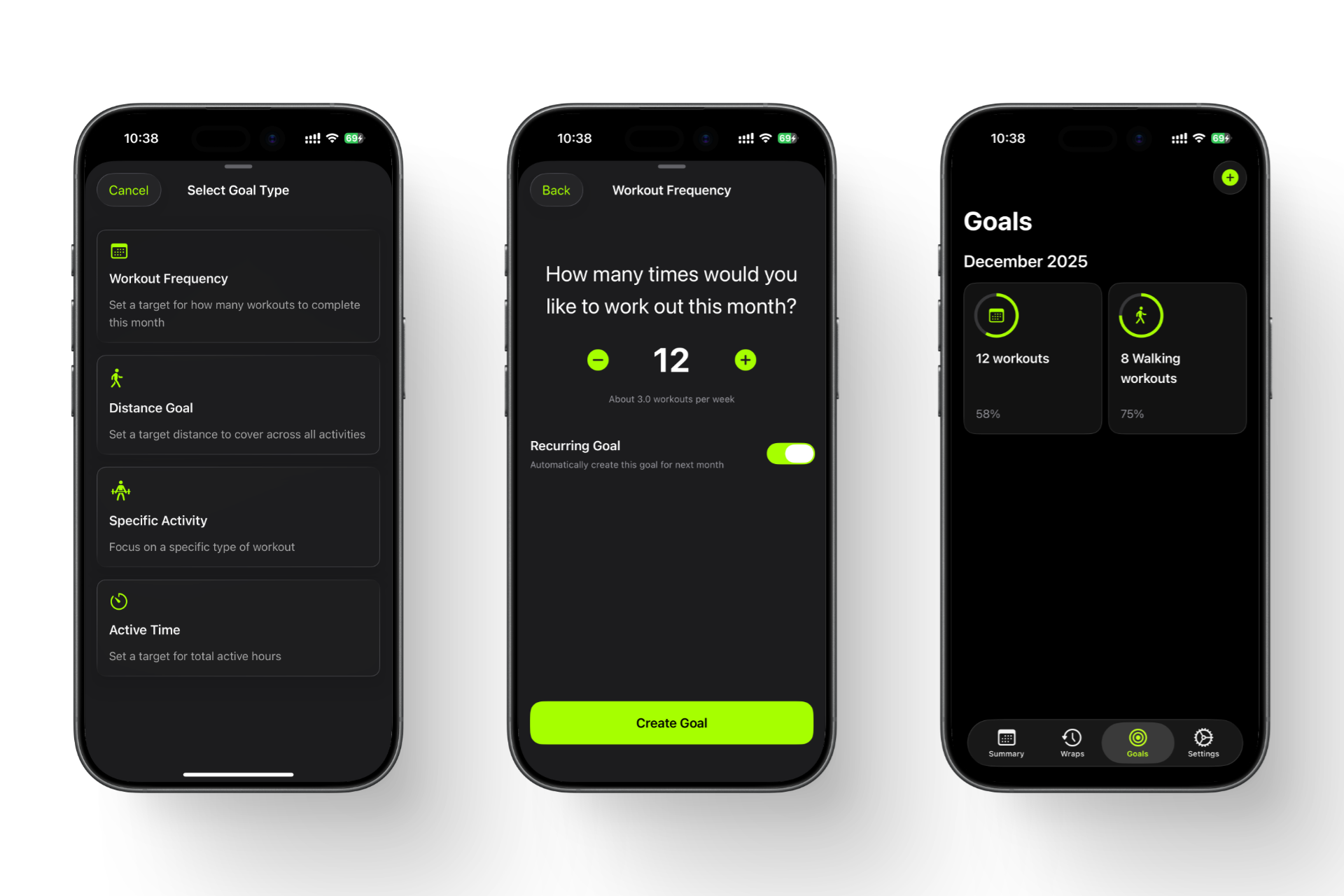
Fitness Wrapped's Goals feature: Select a goal type, configure your target, and track progress with visual indicators
Creating Custom Goals
While Apple's Fitness app focuses on daily Activity rings, you can create custom monthly goals using third-party apps that integrate with Apple Health. Here's how to set up custom goals that work with your Apple Watch data:
Step 1: Choose a Goal Tracking App
Apple's native Fitness app doesn't support custom monthly goals, so you'll need an app that can:
- Access your Apple Health data
- Set custom goal types (workout frequency, distance, specific activities, active time)
- Track progress over monthly periods
- Display visual progress indicators
Apps like Fitness Wrapped provide this functionality, allowing you to create goals that go beyond daily Activity rings.
Step 2: Select Your Goal Type
Most goal-tracking apps offer several goal types:
- Workout Frequency: Perfect for tracking how many times you work out per month
- Distance Goal: Ideal for runners, walkers, and cyclists
- Specific Activity: Great for focusing on one workout type (e.g., "8 Walking workouts")
- Active Time: Best for tracking total hours of activity
Select the goal type that matches what you want to achieve. For beginners, "Workout Frequency" is often the easiest to start with.
Step 3: Configure Your Goal
Once you've selected a goal type, configure your target:
- Set your target: Adjust your goal number to something realistic
- See the breakdown: Many apps show weekly equivalents (e.g., "12 workouts" = "About 3.0 workouts per week")
- Make it achievable: Start with a number you can consistently hit, then increase gradually
Apps typically calculate weekly equivalents automatically, making it easy to understand if your monthly goal is realistic for your schedule.
Step 4: Enable Recurring Goals (Optional)
Some apps offer a "Recurring Goal" feature that automatically renews your goal each month:
- Automatic renewal: Your goal carries over to the next month without manual setup
- Build habits: Perfect for maintaining consistency without recreating goals
- Long-term tracking: Helps you see progress across multiple months
- Flexible: You can always disable it or adjust the goal for specific months
For goals like "Workout Frequency," enabling recurrence helps you maintain consistency month after month without having to remember to set a new goal each time. Fitness Wrapped, for example, includes this feature.
Step 5: Start Tracking
Once you've created your goal, the app will start tracking your progress automatically using data from Apple Health. Every workout you log with your Apple Watch will count toward your relevant goals.
Tracking Your Goal Progress
Apple Fitness focuses on daily completion, but does not provide a clear view of monthly goal progress or consistency trends. This makes it hard to understand whether you're improving over time or just reacting day by day. Here's how to effectively track your goal progress:
Visual Progress Indicators
Effective goal tracking apps provide visual feedback that makes progress easy to understand:
- Progress rings: Circular indicators showing how much of your goal you've completed
- Percentage complete: Clear numerical display (e.g., "58%" or "75%")
- Goal description: Your target clearly stated (e.g., "12 workouts" or "8 Walking workouts")
- Visual identifiers: Icons or colors that distinguish goal types
Progress indicators fill as you get closer to your goal, providing instant visual feedback on how you're doing. This makes it easy to see at a glance which goals need more attention. Apps like Fitness Wrapped display multiple active goals with their progress rings, giving you a comprehensive view of your monthly targets.
Monthly Goal Tracking
Monthly goal tracking offers several advantages over daily-only tracking:
- Set monthly targets: Focus on achievable short-term goals rather than overwhelming yearly objectives
- Track consistency: See if you're maintaining your goals month over month
- Adjust as needed: Modify goals for specific months based on your schedule
- Celebrate monthly wins: Complete a goal and feel accomplished before starting the next month
Apps that support monthly goals typically display the current month (e.g., "December 2025") at the top of the Goals screen, making it clear which time period you're tracking. This monthly view helps you see trends and patterns that daily tracking can obscure.
Real-Time Updates
Goal tracking apps that integrate with Apple Health update automatically as you complete workouts:
- Automatic sync: Apps pull data from Apple Health, so every logged workout counts
- No manual entry: You don't need to manually track—the app does it for you
- Multiple goals: You can have several active goals at once, each tracking independently
- Instant feedback: See your progress indicators update as you complete activities
This automatic tracking means you can focus on working out rather than logging data, while still getting comprehensive insights into your progress.
Understanding Your Progress
Here's how to interpret your goal progress:
- 0-25%: Early in the month—focus on building momentum
- 25-50%: Making progress—stay consistent
- 50-75%: On track—maintain your current pace
- 75-99%: Almost there—push to complete your goal
- 100%: Goal achieved! Consider setting a higher target for next month
Using Recurring Goals
Some goal tracking apps offer the ability to set recurring goals. When you enable this option, your goal automatically carries over to the next month, helping you build consistent habits without the hassle of manually recreating goals each month.
Why Use Recurring Goals?
Recurring goals are perfect for:
- Habit building: Maintain consistency month after month without interruption
- Long-term progress: Track your improvement across multiple months
- Convenience: Set it once and let it automatically renew
- Motivation: See your progress continue seamlessly from month to month
When to Enable Recurring Goals
Enable recurring goals for targets you want to maintain consistently:
- Workout frequency: "12 workouts per month" works great as a recurring goal
- Active time: Monthly active hour targets benefit from automatic renewal
- Distance goals: If you want to maintain a certain monthly distance, enable recurrence
- Specific activities: Goals like "8 Walking workouts" can recur to maintain the habit
Flexibility with Recurring Goals
Even with recurring goals enabled, you maintain full control:
- Adjust anytime: Modify the goal amount for any specific month
- Disable when needed: Turn off recurrence for months with different priorities
- Increase gradually: Bump up your recurring goal as you improve
- Multiple goals: Mix recurring and one-time goals as needed
For example, you might have a recurring "12 workouts per month" goal, but add a one-time "20 workouts" goal for a month when you're training for an event.
Best Practices for Recurring Goals
To get the most out of recurring goals:
- Start conservative: Set a goal you can consistently achieve before enabling recurrence
- Review monthly: Check your progress at month-end and adjust if needed
- Increase gradually: Once you're consistently hitting your goal, increase it by 10-20%
- Use for habits: Recurring goals work best for maintaining consistency, not for one-time challenges
Tips for Staying Motivated
Setting goals is easy; staying motivated to achieve them is the real challenge. Here are proven strategies to maintain your fitness momentum:
Start Small and Build
Don't set overly ambitious goals that lead to burnout. Start with achievable targets and gradually increase them. Success breeds motivation, so celebrate small wins along the way.
Focus on Consistency Over Perfection
Missing a day or falling short of a goal isn't failure—it's part of the journey. Focus on consistency over weeks and months rather than perfect daily performance. A 6-day streak is better than giving up after one missed day.
Use Visual Progress Tracking
Seeing your progress visually is incredibly motivating. Use monthly and yearly wraps from Fitness Wrapped to see how far you've come. Visual summaries make abstract goals concrete and help you appreciate your achievements.
Set Process Goals, Not Just Outcome Goals
Instead of only focusing on results (like "lose 20 pounds"), set process goals (like "work out 4 times per week"). Process goals are more controllable and help build habits that lead to long-term success.
Celebrate Milestones
Don't wait until you reach your ultimate goal to celebrate. Acknowledge weekly achievements, monthly progress, and personal records. Share your wins with friends or on social media to reinforce positive behavior.
Adjust Goals Based on Life
Life happens—busy periods, travel, illness, or stress can affect your ability to meet goals. Adjust your targets during challenging times rather than abandoning them entirely. Flexibility prevents frustration and maintains long-term commitment.
Find Your Why
Connect your fitness goals to deeper motivations: health, energy, confidence, or being able to keep up with kids. When goals feel meaningful, you're more likely to stick with them through challenges.
Frequently Asked Questions
How do I track fitness goals with Apple Watch?
What's a good workout frequency goal for beginners?
Can I have multiple goals active at the same time?
How does Fitness Wrapped track my goal progress?
What should I do if I'm not meeting my goal?
What makes Fitness Wrapped's Goals feature different from Apple's Activity rings?
Ready to take your goal tracking to the next level? Return to home or explore our guides on understanding Apple Fitness stats and reviewing your workout recap.